
If you encounter the following error in XAMPP when starting MySQL
Error: MySQL shutdown unexpectedly.
[mysql]   This may be due to a blocked port, missing dependencies,
[mysql]   improper privileges, a crash, or a shutdown by another method.
[mysql]   Press the Logs button to view error logs and check
[mysql]   the Windows Event Viewer for more clues
[mysql]   If you need more help, copy and post this
[mysql]   entire log window on the forums.
You can refer to this StackOverflow thread for troubleshooting: How can I solve error: MySQL shutdown unexpectedly?
Solution – Fix MySQL Shutdown Unexpectedly in XAMPP
1️⃣ Stop MySQL in the XAMPP Control Panel.
2️⃣ Navigate to C:/xampp/mysql and copy the data folder as a backup (store it somewhere safe).
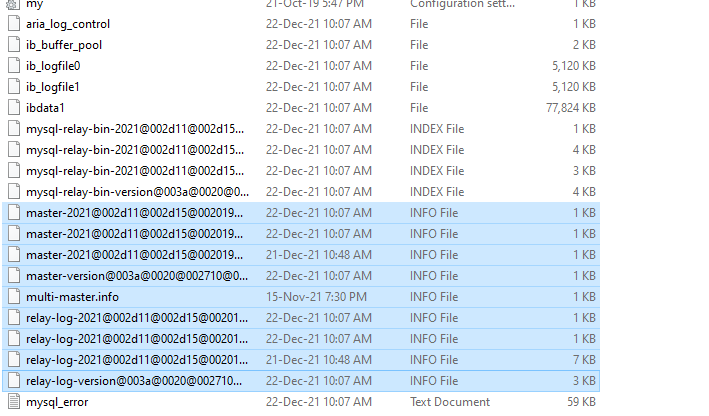
3️⃣ In the original data folder (C:/xampp/mysql), sort files by Type.
4️⃣ Delete all files with the type “INFO File” (these are log files)(screenshot below).
5️⃣ Start MySQL again from the XAMPP Control Panel.
This method has successfully resolved the issue.